The capability to produce high quality video is now literally in the palm of your hand. Find out how video can be used to enhance your teaching and support your students' learning.
- Chemistry video clips can be used in a variety of learning contexts
- Vignettes can deliver short lesson highlights to enhance learning experiences
To suggest that video has revolutionised education over the last three decades would perhaps be something of an exaggeration. However, it is fair to say that video has created a multitude of opportunities for educators and learners alike, and recent developments in technology are paving the way for a genuine revolution. It is easy to forget just how difficult, expensive and time-consuming it was to generate any kind of video material only a few years ago. It was a challenge to get videos to their target audience, with cumbersome VHS cassettes being the medium of choice before CD-Roms became standard. Today, most of us carry around a mobile phone which has a high quality camera. This allows us not only to record videos, but to upload them to YouTube within minutes to reach a potential audience of millions. The possibilities are endless, limited only by the imagination of the individual behind the lens.
Innovative applications
Here, we outline some applications of video that educators working at any level might consider using to enhance the learning experience of their students. The centrepiece is a synopsis of the authors' 'Screencasting and Vignettes' project led by the University of East Anglia (UEA) and supported by the University of Southampton.1 To demonstrate that these approaches are at the fingertips of any willing educator, we have also included case studies detailing examples of innovative educational videos produced by teachers in schools and colleges. We don't attempt to give guidance on the production of videos as there is already extensive material available online, and Michael Seery's recent article on podcasting2 gives many suggestions which are also relevant here.
Video to support chemistry
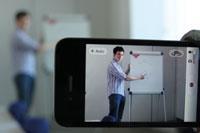
Many chemists can trace their passion for the subject back to a demonstration or experiment that they witnessed in their schooldays. Chemistry has an unparalleled visual appeal, which has attracted video makers from the spheres of both education and entertainment. A quick YouTube search will find tens of thousands of videos of chemistry experiments and the number is growing rapidly. It is common to find teachers and students of chemistry making their own videos of practical experiments and demonstrations, and some examples are discussed in the case studies below. Such video clips may be used in range of contexts, some of which have been discussed in a previous article.3
Screencasting potential
The advent of screencasting, where screen content such as PowerPoint presentations and hand-drawn annotations are captured in video format, has created further opportunities for the innovative educator. This approach has typically depended on the use of screen-capture software, such as TechSmith's versatile package Camtasia,4 which allows detailed editing and processing prior to release.
Entire taught sessions can be recorded and edited before being made available online. Students can then review the media at their own pace, playing challenging sections repeatedly or skipping past clearly understood parts. This is of particular benefit to students for whom English is not their first language, or those with learning disabilities. Usage can be monitored easily by virtual learning environments (VLEs) and a typical pattern has emerged. This normally shows an initial flurry of viewings in the immediate aftermath of the lecture which then fades until the onset of assessment, leading to a frenzy of last minute activity. One frequently expressed concern that screencasts might detract from lecture attendance is not borne out either by the monitoring of attendance or through student evaluations.
The response from students has been very favourable, but is that reason enough to provide them? Whilst genuine educational benefits have been demonstrated,5 is it really an effective use of a student's independent study time to passively observe a 40-50 minute recording of a lecture they have already attended? Screencasts are clearly superior to simple provision of handouts, but are inevitably less effective than a contact hour in which teachers interact dynamically with their students.
Getting straight to the point: Vignettes
To address these limitations, we conceived a leaner, more interactive format: the vignette. A vignette is essentially the edited highlights of a taught session, easily distinguishable from the lecture and has the potential to serve as a genuine open educational resource (OER). The core of the first year undergraduate degree program at UEA was reviewed for key concepts suitable for the vignette treatment. In close collaboration with the lecturers, a team of postgraduate editors selected 3-5 minute highlights from our assembled archive of recordings. These were annotated, augmented and enhanced using the full range of features within Camtasia, to produce bite-sized interactive multimedia learning aids. We reintroduced some of the interactivity lost in the recording by adding questions which helped to ensure the students watching did not slip into counterproductive passivity.
One of the challenges associated with the provision of resources like screencasts and vignettes is their effect on student expectation levels, placing extra strain on teaching staff who are already over-burdened by the demands of the job. An excellent way to increase the numbers of such resources available, and to manage expectation levels, is to involve students in the generation of material. This can be particularly rewarding if live action chemistry demonstrations are used as examples to support theory teaching. Students who have grown up using the requisite technology may bring a degree of flare and professionalism to the process of video production that teaching staff might lack!
Practical approaches for teachers:
Case study 1
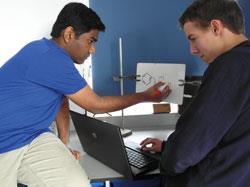
At Itchen College in Southampton, chemistry teacher Judith Peel uses video in a number of ways. Practical work is supported by videos which were taken on a smartphone and edited on a PC. Videos showing particular experiments were already available on YouTube, but they weren't pitched at the right level and often missed out key information. The production of bespoke videos in-house ensures that the most important points are addressed, and that the equipment shown is the same as that used in the school/college. Students found these videos very useful, both in preparing for practical work and at the write-up stage.
At Itchen they also produce stop-motion videos outlining organic reaction mechanisms using curly arrows. In an excellent example of peer-teaching, students worked in pairs to generate videos of different mechanisms which were written onto mini-whiteboards and captured using laptop webcams (see photograph). Students transferred the images into PowerPoint which produces a stop-motion sequence showing the full mechanism. In the initial trial, each pair showed their mechanism to the whole class and received immediate feedback from the teacher, with a winning group declared at the end of the lesson. This approach lends itself to a range of different approaches including self- and peer-assessment, and has wide applicability across the whole subject.
Case study 2
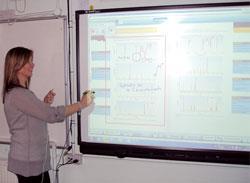
At The Sixth Form College Farnborough, chemistry teachers Graham Stringer and Judi Crawford have experimented with video for a couple of years. To support the delivery of their extensive practical programme, the chemistry technician team have been employed to produce videos of different experiments using simple digital cameras. The clips are edited using Microsoft's free Movie Maker software and delivered to students via the college VLE. The growing library already features over sixty video clips, and work is in progress to expand this. Not only do students benefit from these clips, but teachers who are new to the college, or are new to teaching chemistry, have used the videos to refresh their practical knowledge.
The Farnborough team has also exploited the versatility of the interactive whiteboard software to create screencasts which have been shared with students. In one example, the mark scheme for an exam question on analytical chemistry is explained, with a focus on exam technique. The key benefit of this approach is that the teacher can model the thought processes involved in formulating an answer, which in this case includes the annotation of spectra with accompanying commentary to highlight key points and offer valuable advice. Farnborough students have responded positively to the initiative, providing extensive feedback (see box).
Positive feedback
The videos allow students to work together to revisit difficult topics and boost their understanding, which has been very well received.
'We can revisit videos anytime and gain an insight that you don't get from books.'
'Video mark schemes help you to see where you went wrong rather that staring at a static page.'
'Videos help you to get through the different steps and structure a good answer.'
'Videos are useful as I can revisit specific sections I don't understand as many times as I want'.
Conclusions
Just as video didn't really 'kill the radio star', videos and screencasts are no substitute for an interactive and dynamic teaching environment. The true value of these resources lies in the fact that they allow teachers to make more effective use of precious face-to-face contact time, which might otherwise be wasted on the communication of content that could appropriately be delivered in video format. The availability of video resources means that students can adapt their studies to fit a 24/7 lifestyle, allowing them to access material when and where they want to do so, and experience genuine student-centred learning.
The Chemistry Vignettes
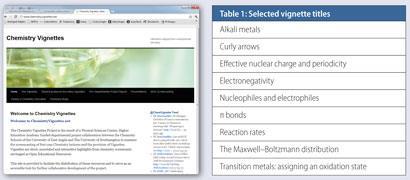
The Chemistry Vignettes website6 currently hosts more than 60 vignettes produced by the team at UEA (Table 1 presents an illustrative list of example vignette titles). The vignettes are available in 3 different formats with different levels of interactivity/compatibility, and are freely provided as OERs with a simple attribution only creative commons license. Many of the vignettes are appropriate for A-level students, and teachers at pre-university level have much to gain from exploring the potential of these resources.
David Read is a School Teacher Fellow in Chemistry at the University of Southampton. Simon Lancaster is a Senior Lecturer in Chemistry at the University of East Anglia
Acknowledgements
The authors would like to thank the Higher Education Academy Physical Sciences Centre for funding the 'Screencasts and Vignettes' project, and numerous colleagues and students who contributed throughout.
References
- S J Lancaster and D Read, Wavelength, 2011, 7, 40
- Education in Chemistry, March 2012, p19 (Podcasting)
- Education in Chemistry, July 2008, p122 (E-learning in practice)
- Camtasia (free trial) available at http://tinyurl.com/ca5wh5l (accessed 15 May 2012). CamStudio is an alternative which is freely available at: http://camstudio.org (accessed 15 May 2012).
- C J Andrews et al, New Dir. Teach. Phys. Sci., 2010, 6, 56 (http://bit.ly/oyHb2g)
- [link no longer available]






No comments yet